Features
|
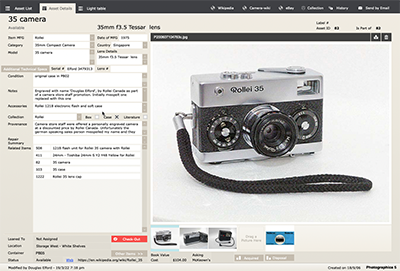
Upon starting the application one comes to the Record Details form view for the type of device ypu are using. This layout enables quick access to common tasks, such as creating new records, editing existing records, finding sorting or deleting records along with referencing illustrative images of the collection. The Details view screen gives you the most comprehensive information about any one item at one time.
The included Provenance field enables documenting an item's provenance (history of use) along with pop-ups covering Aquisition, Disposal and Loan for recording information such as source, cost, repair costings, selling details and description, Profit/Loss and loan details. It also lists Other collection items stored in the same location.
If you have electronic documentation or scanned users manuals you can ‘attach’ one or more of them to a specific record. Simply drag and drop the PDF into one of the image boxes.
|
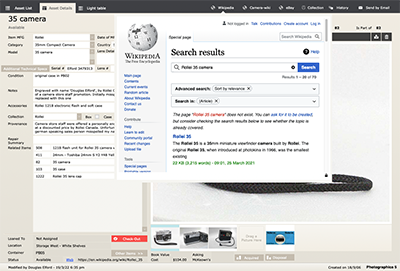 |
The various web viewers are a feature to Photographica. The Wikipedia viewer utilises the Manufacturer field, along with the first four words of the Model field as search criteria. Once open users can change the search details, naviagte or open in your favourite web browser.
Additionally the actual Web field, specifically allows the users to type or paste in a primary single specific web address, which will be saved and accessed any time the user is connected to the Internet and accesses the web viewer tab. This could be used to specify the item listing in a manufacturer's history site.
|
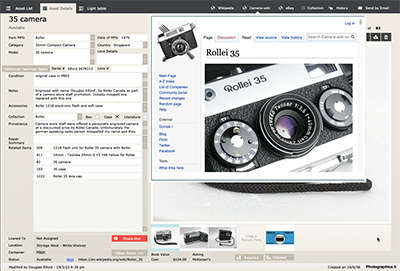 |
Similarily, the Camera-wiki viewer similarly utilises the Manufacturer field, along with the first four words of the Model field as search criteria. This site may require some further refinement of the exact search terms within the site’s own search engine. |
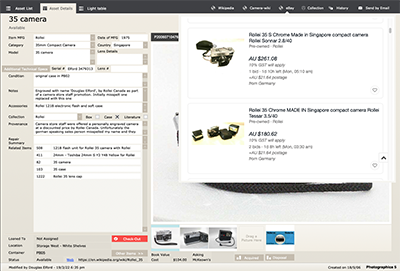 |
As per the other web viewers, this one is set to initially search locally in eBay Australia. If results are limited, one can change it to 'Worldwide'. Again, one can edit the specifc search terms to narrow the search or open eBay in your favourite web browser. |
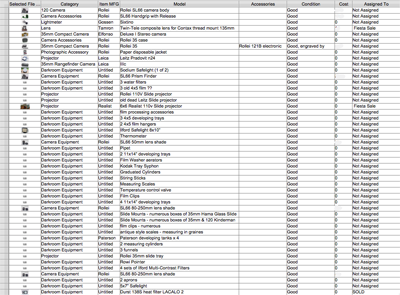 |
A 'Spreadsheet' view is also available which enable previewing data for exporting too. |
|
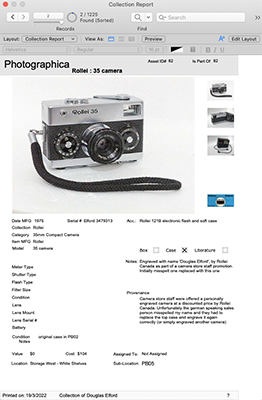
This Collection Report view covers most of the details along with a large illustrative image, all on one A4 Portrait layout for easy report printing and binding or saving as a PDF eBook. |
|
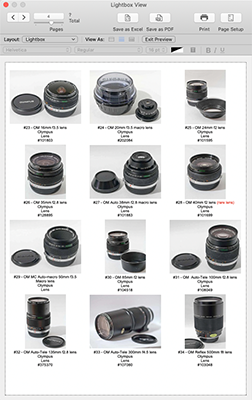
The Lightbox view provides a series of thumbnail images of the items along with three lines of common information. This can be useful for comparing searches on specific criteria such as Manufacturer or Model. It can also used to print 'Contact Sheet' printouts of collection items in PDF or paper formats.
It inludes the Asset ID number, Model, Item Manufacturer, Category and Serial Number. |
|